
AddressLab
International Address Form Tester
Test an international address form with maintained country rules instead of guessing whether every market fits a US-style layout. Load a valid, invalid, Unicode, length-boundary, or no-postal-code scenario; edit the fields; then get a field-level QA report directly in your browser without submitting data to AddressLab.
Reproducible tool walkthroughs
These examples run synthetic inputs through the current tool rules. They are not customer studies, real orders, or delivery checks. 2026-09-07.2
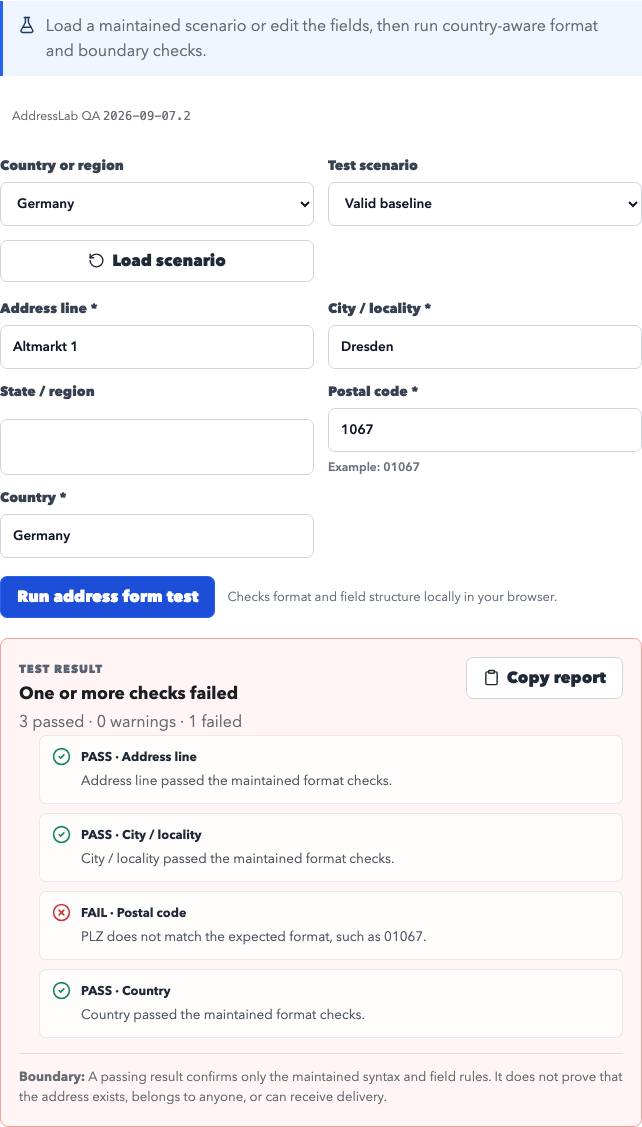
2. Optional German state and an invalid postcode
Select Germany in the Form Tester, enter these fields, and leave State empty. Run once, change 01067 to 1067, and run again. Open tool
{
  "street": "Altmarkt 1",
  "city": "Dresden",
  "region": "",
  "postalCode": "01067",
  "country": "Germany"
}
Actual results: {"passed":4,"warnings":0,"failed":0} → {"passed":3,"warnings":0,"failed":1}. The second run fails the postal format check; the empty state does not fail. Passing means only a match with maintained rules.
Download this version's examples and full inputs/results: CSV · JSON · Settings · Full results
Release notes: this version corrects German address order, country-specific postal boundaries, optional UK/German region fields, and Japanese postal normalization. CSV no longer writes formulas. An old seed can produce different data after an update; retain your exported files.
Rule references: Deutsche Post addressing FAQ · Royal Mail: optional county information · Data and editorial standards
Use cases
- Check required fields, country-specific labels, region values, postal-code syntax, and maximum-length boundaries before a form reaches production.
- Load reproducible valid and invalid scenarios for regression testing, bug reports, acceptance criteria, and localization reviews.
- Verify that Unicode address input and regions without postal codes do not fail because of US-only assumptions.
- Copy a concise result report containing pass, warning, and fail findings for a QA ticket or test checklist.
Generated fields
Supported regions and formats
Address format notes
- The tester evaluates maintained field and syntax rules locally in the browser; entered values are not sent to AddressLab.
- A passing result does not prove that an address, building, recipient, postal code assignment, or delivery point exists.
- Warnings identify limits or uncertainty that need product-team review instead of making unsupported validity claims.
What this address form tester checks
The test engine checks whether required fields are present, applies country-aware normalization, evaluates maintained region and postal-code patterns, and reports unusually long fields. Results stay ordered by the address fields shown for the selected country, making failures easy to reproduce in QA tickets.
What this tool does not verify
AddressLab does not contact postal operators, geocoding services, residents, or delivery databases. The result describes form structure and syntax only. It cannot establish that an address exists, is assigned to a person, is current, or can receive mail or parcels.
QA walkthrough: catch a US-only postal-code rule
Choose Canada, load the valid baseline, and run the test to confirm that the alphanumeric K1A 0B1 pattern passes. Then load the invalid postal-code scenario and run it again. The report should identify the postal-code field without rejecting unrelated street, city, province, or country fields.
QA walkthrough: test a region with no postcode
Load the region-without-postal-codes scenario. The tester switches to Hong Kong and removes the postal-code input from the applicable field set. Running the test confirms that a blank postcode is not treated as a missing required value.
How this page was checked
Last format review:
What we checked
- Required and applicable fields for six distinct address systems
- Country-aware postal-code capitalization, spacing, separators, and syntax
- Region labels, Unicode input, field-length warnings, and Hong Kong's normal absence of a postcode
- Clear separation between form-format testing and address existence or deliverability
Primary references
- USPS Publication 28: Postal Addressing Standards
- Canada Post: Addressing guidelines
- Royal Mail: How to address your mail
- Japan Post: Postal-code search and address guidance
- Hongkong Post: Correct Addressing
Data boundary: This tool tests maintained form requirements, length boundaries, normalization, and postal-code syntax in the browser. It does not query postal operators, validate a street or recipient, establish that a postal code is currently assigned, or confirm that an address can receive delivery. Read the data methodology and editorial standards
Not for
Generated data is for testing, development, education, and prototypes only. Do not use it for delivery, impersonation, fraud, or bypassing platform rules.
- Do not use generated records as real delivery destinations.
- Do not use generated identities, addresses, or email fields for fraud, impersonation, spam, or platform rule bypassing.
- Do not enter passwords, production credentials, payment data, or personal information into test records.
FAQ
Can this tool test international address form validation?
Yes. It provides field-level structure and syntax checks for six address systems and includes maintained scenarios for common QA boundaries.
Does a passing result mean an address is real?
No. A pass covers only the maintained form and format rules. It does not verify existence, ownership, official assignment, or deliverability.
Does AddressLab store the address fields I enter?
No. The test runs locally in your browser. Analytics events contain only the selected country, scenario, and overall result—not entered field values.
Why does Hong Kong not show a postal-code field?
Hong Kong addresses generally do not use postal codes, so the tester treats that field as not applicable rather than inventing a required value.