
AddressLab
Address Parser & Formatter
Paste a synthetic or non-sensitive address, detect explicit country and postal-format clues, and split the text into editable address fields. AddressLab preserves unmatched text and marks uncertain fields instead of silently inventing values. After review, copy the result as a single line, mailing label, JSON, or CSV row.
Reproducible tool walkthroughs
These examples run synthetic inputs through the current tool rules. They are not customer studies, real orders, or delivery checks. 2026-09-07.2
3. Structured parsing and uncertain input
Leave country detection on automatic, paste this text, and select Parse address. Open tool
Altmarkt 1
01067 Dresden
Germany
Actual mailing-label output:
Altmarkt 1
01067 Dresden
Germany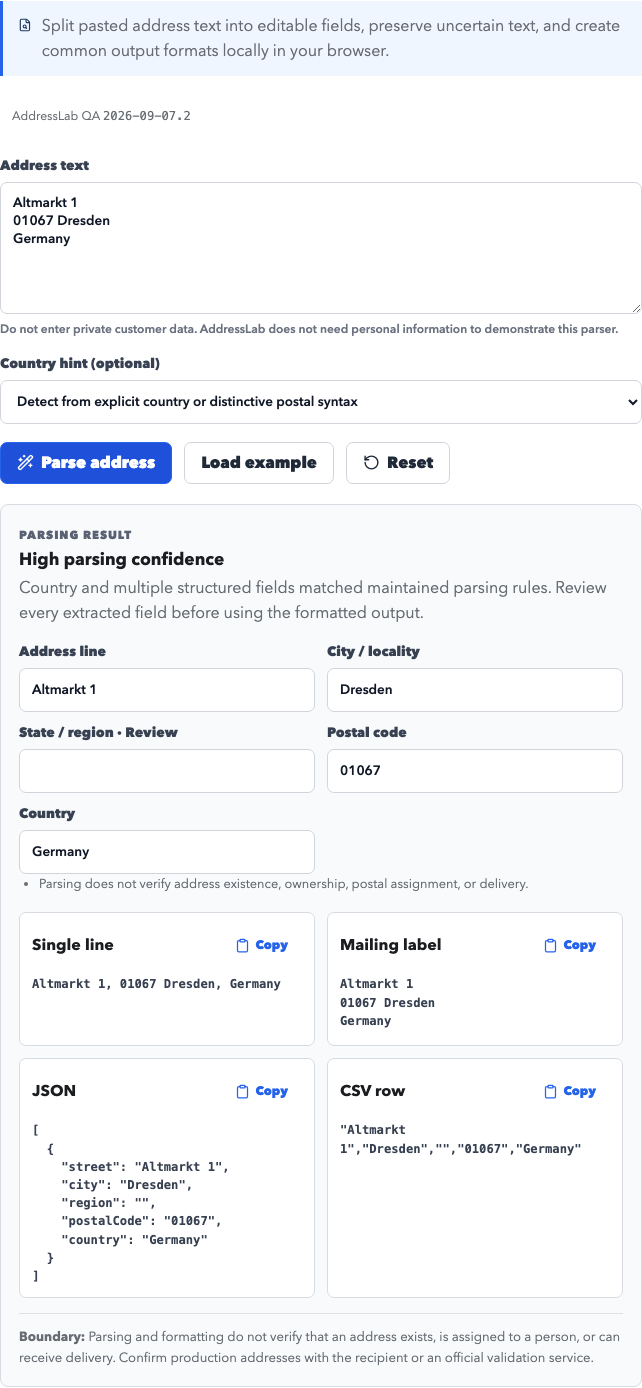
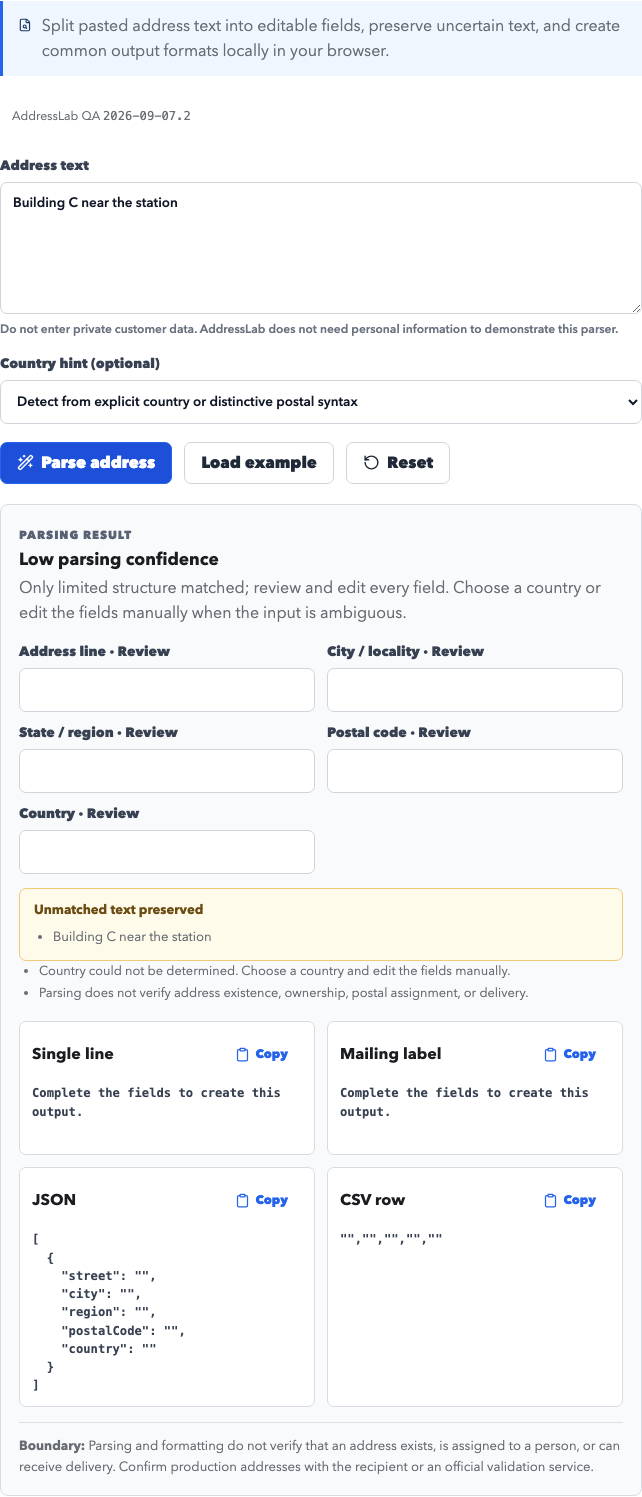
Then enter Building C near the station. Actual confidence is low. The parser preserves uncertain text. Supply the country and fields manually; parsing confidence does not establish address existence.
Download this version's examples and full inputs/results: CSV · JSON · Settings · Full results
Release notes: this version corrects German address order, country-specific postal boundaries, optional UK/German region fields, and Japanese postal normalization. CSV no longer writes formulas. An old seed can produce different data after an update; retain your exported files.
Rule references: Deutsche Post addressing FAQ · Royal Mail: optional county information · Data and editorial standards
Use cases
- Turn copied synthetic address text into street, locality, region, postal-code, and country fields for form and import testing.
- Review which values were extracted confidently and which fields or unmatched lines still require a human decision.
- Convert reviewed fields into a single line, mailing-label layout, JSON object, or CSV row without retyping the address.
- Test how international address ordering, Unicode, postcode placement, and regions without postal codes interact with a target schema.
Generated fields
Supported regions and formats
Address format notes
- Parsing uses conservative browser-local rules and preserves text that cannot be assigned confidently; pasted values are not uploaded to AddressLab.
- Users can edit every extracted field before copying output, and manually supplied corrections replace uncertainty rather than pretending the parser knew the answer.
- Formatting does not establish existence, ownership, official postal assignment, geocoding accuracy, or deliverability.
How conservative address parsing works
The parser first normalizes whitespace, then looks for an explicit country and maintained postal syntax. It assigns only fields supported by recognizable structure. Ambiguous lines remain in an unmatched section, while missing or uncertain fields are labeled for review instead of being completed from guesses.
Parsing confidence is not address validation
High parsing confidence means that several pieces of text matched a maintained structural rule. It says nothing about whether a building exists, who occupies it, whether a postcode is currently assigned, or whether a carrier will deliver there. Production data still needs recipient confirmation or an appropriate validation provider.
Address-to-JSON walkthrough
Load the synthetic US example and parse it. Review the five extracted fields, make any correction in the editable controls, and copy the JSON output. The same reviewed fields also produce the single-line, mailing-label, and CSV-row variants, which helps compare representations during form, API, and import QA.
Handling ambiguous and international input
If the country is missing, the parser may suggest Canada, the UK, or Japan only when distinctive postal syntax is present. Otherwise it asks for a country hint. Japanese ordering and Hong Kong's normal lack of a postcode are handled separately from Western city-region-postcode layouts.
How this page was checked
Last format review:
What we checked
- Whitespace normalization and conservative extraction from single-line and multiline input
- Explicit country recognition and limited country suggestions from distinctive postal syntax
- Preservation of unmatched text and visible labeling of uncertain fields
- Country-aware single-line, mailing-label, JSON, and CSV-row formatting
Primary references
- Universal Postal Union: Addressing Solutions
- USPS Publication 28: Postal Addressing Standards
- Canada Post: Addressing guidelines
- Japan Post: Postal-code search and address guidance
Data boundary: This local rules-based parser reorganizes text; it is not an address-validation, geocoding, identity, property, or delivery service. A confidence label describes structural extraction only. Review every field and use recipient-confirmed or official validation data for production delivery. Read the data methodology and editorial standards
Not for
Generated data is for testing, development, education, and prototypes only. Do not use it for delivery, impersonation, fraud, or bypassing platform rules.
- Do not use generated records as real delivery destinations.
- Do not use generated identities, addresses, or email fields for fraud, impersonation, spam, or platform rule bypassing.
- Do not enter passwords, production credentials, payment data, or personal information into test records.
FAQ
Can this parser verify a real address?
No. It organizes text using maintained format rules. It does not query postal, property, identity, geocoding, or delivery databases.
What happens when a field is ambiguous?
The parser marks the field for review or preserves the original text as unmatched. It does not silently invent missing address data.
Can I convert an address to JSON or CSV?
Yes. After reviewing the extracted fields, you can copy single-line, mailing-label, JSON, and CSV-row output.
Is pasted address data sent to AddressLab?
No. Parsing and formatting run locally in the browser. Use synthetic or non-sensitive input and avoid entering private customer records.