
AddressLab
Synthetic Test Data Generator
Generate structured synthetic test records for regression tests, form QA, imports, prototypes, and seed datasets. Choose a country, row count, output schema, and normal or boundary mode. A fixed random seed recreates the same records on another run, while CSV and JSON exports keep the dataset portable.
Reproducible tool walkthroughs
These examples run synthetic inputs through the current tool rules. They are not customer studies, real orders, or delivery checks. 2026-09-07.2
1. Replay a leading-zero postcode fixture
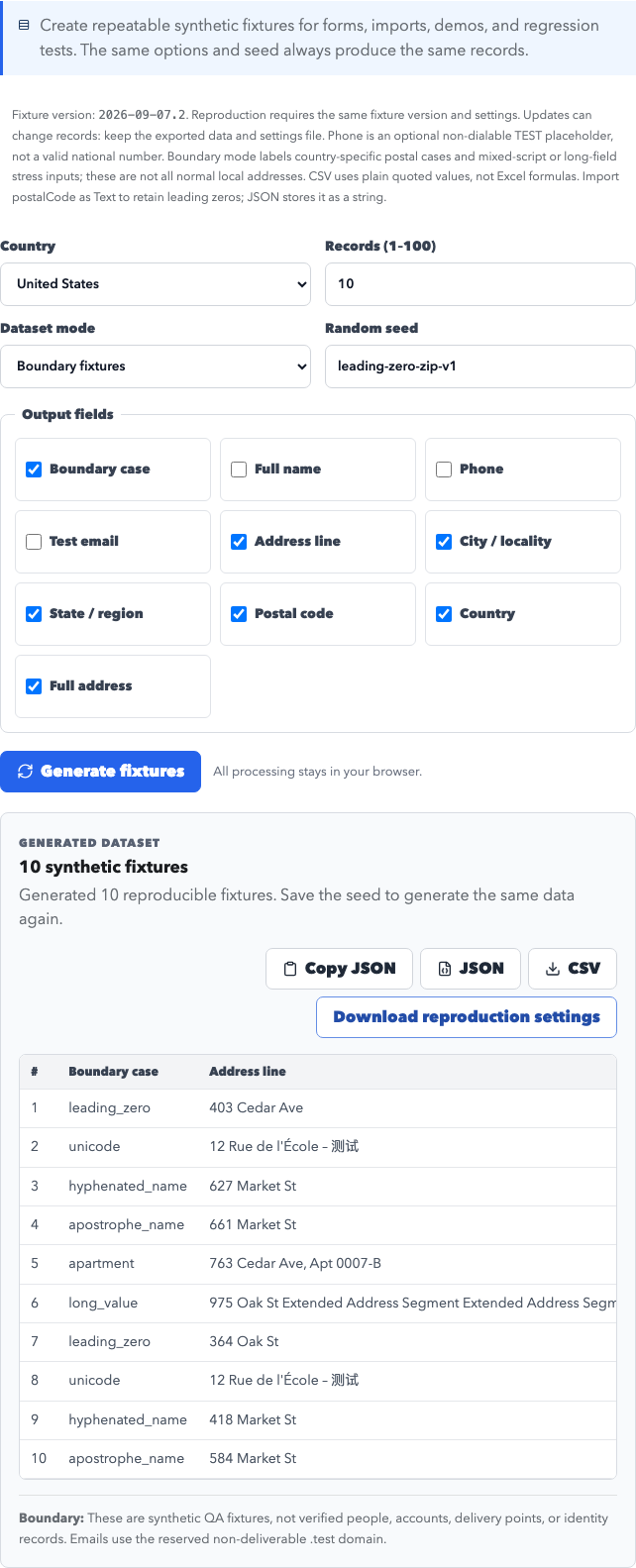
Open the Test Data Generator. Choose US, 10 rows, Boundary fixtures, and seed leading-zero-zip-v1. Select fields in the order below and generate twice. Open tool
{
  "version": "2026-09-07.2",
  "countryCode": "US",
  "count": 10,
  "fields": [
    "case",
    "street",
    "city",
    "region",
    "postalCode",
    "country",
    "fullAddress"
  ],
  "mode": "boundary",
  "seed": "leading-zero-zip-v1"
}
Actual first record:
{
  "case": "leading_zero",
  "street": "403 Cedar Ave",
  "city": "Boston",
  "region": "MA",
  "postalCode": "02108",
  "country": "United States",
  "fullAddress": "403 Cedar Ave, Boston, MA 02108, United States"
}
Repeated execution with identical settings produces identical JSON. Numeric conversion demonstrates the failure: 02108 → 2108. CSV retains the literal string, but spreadsheets can infer a numeric type; import the postal column as Text. This is a numeric-conversion demonstration, not a claim to have tested a particular spreadsheet release.
Download this version's examples and full inputs/results: CSV · JSON · Settings · Full results
Release notes: this version corrects German address order, country-specific postal boundaries, optional UK/German region fields, and Japanese postal normalization. CSV no longer writes formulas. An old seed can produce different data after an update; retain your exported files.
Rule references: Deutsche Post addressing FAQ · Royal Mail: optional county information · Data and editorial standards
Use cases
- Create repeatable address-shaped fixtures for automated tests, regression runs, bug reports, database seeds, and product demonstrations.
- Exercise Unicode, long values, apartment identifiers, hyphenated names, apostrophes, and leading-zero postal codes with labeled boundary cases.
- Choose only the fields your form, import, API mock, or database schema expects, then export the same ordered schema as CSV or JSON.
- Share a seed and configuration with another tester so both people can reproduce the same synthetic dataset without sharing customer information.
Generated fields
Supported regions and formats
Address format notes
- The generator uses deterministic browser-local logic: the same country, mode, fields, count, and seed reproduce the same records.
- Email values are randomly assembled using common provider domains and may match existing mailboxes. AddressLab does not create accounts, check ownership, or send or receive messages. Do not send mail to these samples or use them for real registrations. Use a mailbox you control for delivery tests.
- Geographic fixtures support format testing, but generated record combinations do not represent verified people, accounts, properties, or delivery destinations.
How fixed random seeds help QA
Random data is difficult to debug when every run changes the failing input. AddressLab converts the seed and selected options into a deterministic random sequence. Recording a seed in a test case or issue lets a developer regenerate the same rows, fix the defect, and rerun the original dataset as a regression check.
What normal and boundary datasets contain
Normal mode creates consistent address-shaped records for routine form and import coverage. Boundary mode rotates through labeled cases such as a leading-zero postal code, Unicode characters, hyphenated and apostrophe names, apartment data, and a long address line so teams can inspect behavior that a simple happy-path record misses.
CSV and JSON export walkthrough
Select a country and the fields required by your target schema, enter a memorable seed, and generate the dataset. Review the first rows in the browser, then download CSV for spreadsheet or import testing and JSON for API mocks or fixtures. Regenerate with the same options to confirm the output is unchanged.
What this generator deliberately excludes
AddressLab does not generate SSNs, passports, government identifiers, passwords, payment-card data, bank data, or working inboxes. The output is designed for development and testing, not identity verification, account creation, financial workflows, or delivery.
How this page was checked
Last format review:
What we checked
- Deterministic output for identical seeds and options
- Country-consistent maintained geography fixtures and explicitly synthesized personal fields
- CSV escaping, Unicode handling, field ordering, and leading-zero postal-code preservation
- Exclusion of government, authentication, payment, and real-mailbox data
Primary references
- IANA: Special-Use Domain Names
- RFC 2606: Reserved Top Level DNS Names
- USPS Publication 28: Postal Addressing Standards
Data boundary: This tool creates deterministic synthetic fixtures for development and QA. Geographic examples support format coverage, but record combinations are not verified people, accounts, properties, postal assignments, or delivery points. Do not use the output for identity, financial, authentication, or production delivery workflows. Read the data methodology and editorial standards
Not for
Generated data is for testing, development, education, and prototypes only. Do not use it for delivery, impersonation, fraud, or bypassing platform rules.
- Do not use generated records as real delivery destinations.
- Do not use generated identities, addresses, or email fields for fraud, impersonation, spam, or platform rule bypassing.
- Do not enter passwords, production credentials, payment data, or personal information into test records.
FAQ
What is a random seed?
A seed is a text value that initializes the generator. Using the same seed and options produces the same synthetic records again.
Can I export test data as CSV and JSON?
Yes. CSV contains literal quoted values without Excel formulas. Import the postalCode column as Text to retain leading zeros in spreadsheets. JSON preserves postal codes as strings. Download reproduction settings and keep the data files for use after a version update.
Does AddressLab generate real identities?
No. Records are synthetic testing fixtures and do not establish a real person, account, property, or deliverable address.
Is generated data uploaded or stored?
No. Generation and export happen locally in the browser. Aggregate analytics contain only country, mode, row count, and export format.