
US address format guide
How to Fill Out a US Address: Street, City, State, and ZIP Code
Most US address-form errors come from putting the right value in the wrong field. Here is the field mapping, followed by four address samples I generated and checked by state.
The short answer
- Street / Address Line 1
- House number and street name, such as
1315 K St - City
- The city or locality, such as
Sacramento - State
- The state, usually as a two-letter USPS abbreviation such as
CA - ZIP Code
- The five-digit postal code, such as
95814 - Country
United StatesorUS, when the form asks for it
Put together, the example is 1315 K St, Sacramento, CA 95814, United States.
What I tested in AddressLab
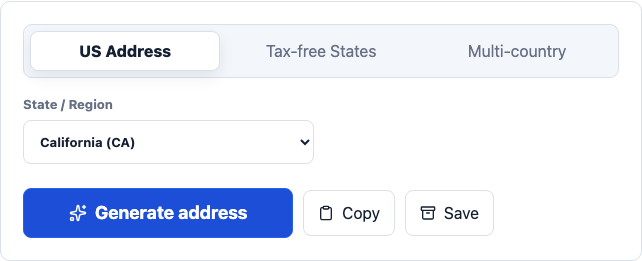
On July 29, 2026, I selected California, New York, Delaware, and Texas one at a time in the English US Address Generator. I generated one record for each state and checked whether the City, State, and ZIP Code stayed consistent with the selected state. Names, phone numbers, and temporary email addresses were outside this test.
| Selected state | Generated Street | City | State | ZIP Code |
|---|---|---|---|---|
| California | 3841 Olympic Blvd | Los Angeles | CA | 90012 |
| New York | 3527 Washington Ave | Albany | NY | 12207 |
| Delaware | 9555 Walnut St | Wilmington | DE | 19801 |
| Texas | 165 6th St | Austin | TX | 78701 |
All four records kept the city, state abbreviation, and ZIP Code within the selected state. For QA work, this fixed-state mode is more useful than repeatedly generating random records: a test can assert the expected state first, then check the dependent fields, saved-address display, and export.
What belongs in Street or Address Line 1?
Street normally means the primary delivery line: house number followed by street name. In the California screenshot below, that field is 1315 K St.
If the address includes an apartment, suite, room, or unit, put that detail in Address Line 2 when the form provides one. USPS-recognized secondary unit designators include APT, STE, UNIT, and RM. A form with no second line may accept the unit after the street, for example 1315 K St APT 3B.
Do not put the city or state in this field. That may look harmless in a visual preview but creates duplicate values in saved records and API payloads.
How City, State, and ZIP Code fit together
USPS calls the city, state, and ZIP Code the last line of a domestic address. In a web form, these values are usually separated:
- City: enter the locality, such as Sacramento.
- State: choose the state name from a list, or enter its official two-letter abbreviation in a text field.
- ZIP Code: enter the five-digit code unless the form explicitly supports ZIP+4.
Store ZIP Codes as text, not numbers. A valid code such as 02108 loses its leading zero when software converts it to the number 2108. This bug often appears after CSV import or when a database column uses an integer type.
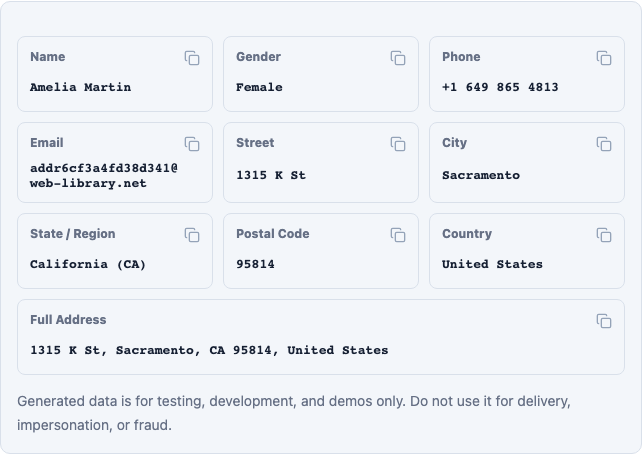
Web form format versus mailing-label format
A web form stores the example as individual values:
Address Line 11315 K St
CitySacramento
StateCA
ZIP Code95814
CountryUnited States
A domestic mailing label would commonly show the same data as:
AMELIA MARTIN
1315 K ST
SACRAMENTO CA  95814
The label version omits commas and the country because it follows a US domestic mailing convention. A checkout confirmation can still use commas for readability. The important part is preserving the correct field values, not forcing a mailing-label presentation into every interface.
Five mistakes worth testing
- State entered as City: Sacramento belongs in City; California or CA belongs in State.
- Invented state abbreviations: use CA, not CAL or Calif.
- ZIP Code stored as a number: this removes leading zeros from codes in states such as Massachusetts.
- Phone area code used as ZIP Code: the two codes serve different purposes and are not interchangeable.
- A formatted sample treated as a delivery address: consistent fields do not confirm that a synthetic house number receives mail.
Where a generated address helps, and where it stops
AddressLab is useful when I need separate values for a signup form, checkout prototype, saved-address card, JSON payload, or CSV export. Each field can be copied on its own, which makes it easier to isolate a failing input instead of pasting and splitting a complete address.
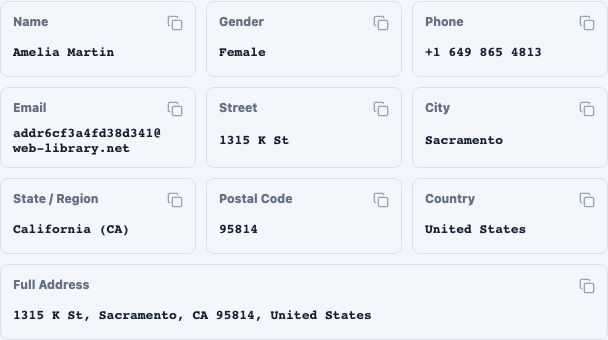
The limitation matters: AddressLab uses synthetic test data. The dataset keeps City, State, and ZIP Code combinations structured, but it does not prove that a generated house number is a real residence or a deliverable destination. Do not use these samples for shipping, identity checks, account verification, or financial activity. See the data methodology and editorial standards for the documented boundary.
A quick check before submitting the form
Read the values back in this order: house number and street, city, two-letter state code, five-digit ZIP Code. Then inspect the combined preview to catch a value that landed in the wrong input.
Use the US Address Generator when you need a complete test record. If the form has strict postal validation, continue with the ZIP Code field testing checklist.